Ragas Experimental
A framework for applying Evaluation-Driven Development (EDD) to AI applications.
The goal of Ragas Experimental is to evolve Ragas into a general-purpose evaluation framework for AI applications. It helps teams design, run, and reason about evaluations across any AI workflow. Beyond tooling, it provides a mental model for thinking about evaluations not just as a diagnostic tool, but as the backbone of iterative improvement.
✨ Introduction
-
🚀 Tutorials
Step-by-step guides to help you get started with Ragas Experimental. Learn how to evaluate AI applications like RAGs and agents with practical examples.
-
📚 Core Concepts
A deeper dive into the principles of evaluation and how Ragas Experimental supports evaluation-driven development for AI applications.
-
🛠️ How-to Guides
Step-by-step guides for specific tasks and goals using Ragas experimental features.
Hello World 👋
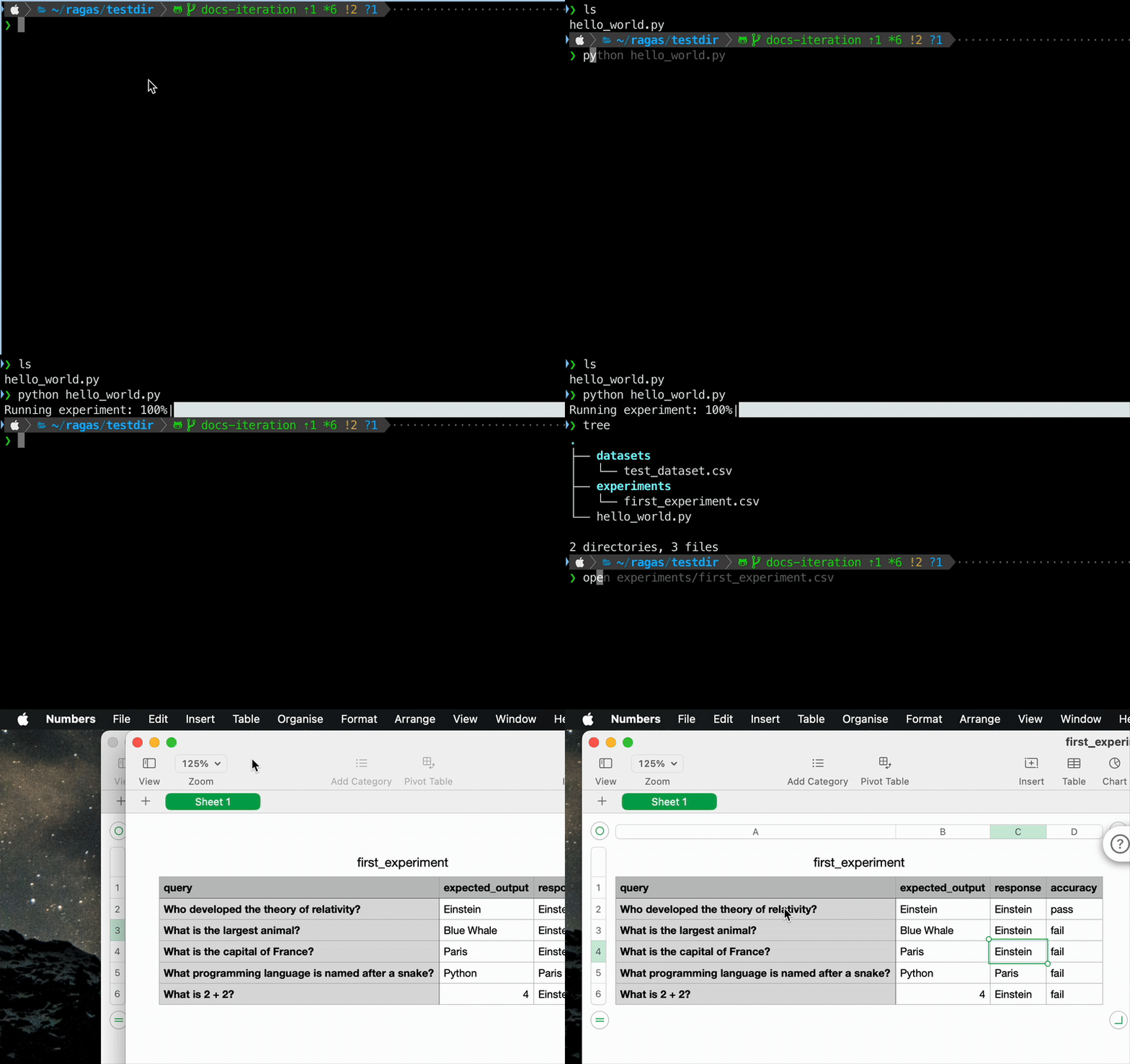
1. Install Ragas Experimental with local backend
2. Copy this snippet to a file named hello_world.py and run python hello_world.py
import numpy as np
from ragas_experimental import Dataset
from ragas import experiment
from ragas.metrics import MetricResult, discrete_metric

# Define a custom metric for accuracy
@discrete_metric(name="accuracy_score", allowed_values=["pass", "fail"])
def accuracy_score(response: str, expected: str):
    result = "pass" if expected.lower().strip() == response.lower().strip() else "fail"
    return MetricResult(value=result, reason=f"Match: {result == 'pass'}")

# Mock application endpoint that simulates an AI application response
def mock_app_endpoint(**kwargs) -> str:
    return np.random.choice(["Paris", "4", "Blue Whale", "Einstein", "Python"])

# Create an experiment that uses the mock application endpoint and the accuracy metric
@experiment()
async def run_experiment(row):
    response = mock_app_endpoint(query=row.get("query"))
    accuracy = accuracy_score.score(response=response, expected=row.get("expected_output"))
    return {**row, "response": response, "accuracy": accuracy.value}

if __name__ == "__main__":
    import asyncio

    # Create dataset inline
    dataset = Dataset(name="test_dataset", backend="local/csv", root_dir=".")
    test_data = [
        {"query": "What is the capital of France?", "expected_output": "Paris"},
        {"query": "What is 2 + 2?", "expected_output": "4"},
        {"query": "What is the largest animal?", "expected_output": "Blue Whale"},
        {"query": "Who developed the theory of relativity?", "expected_output": "Einstein"},
        {"query": "What programming language is named after a snake?", "expected_output": "Python"},
    ]

    for sample in test_data:
        dataset.append(sample)
    dataset.save()

    # Run experiment
    results = asyncio.run(run_experiment.arun(dataset, name="first_experiment"))
3. Check your current directory structure to see the created dataset and experiment results.
Output:
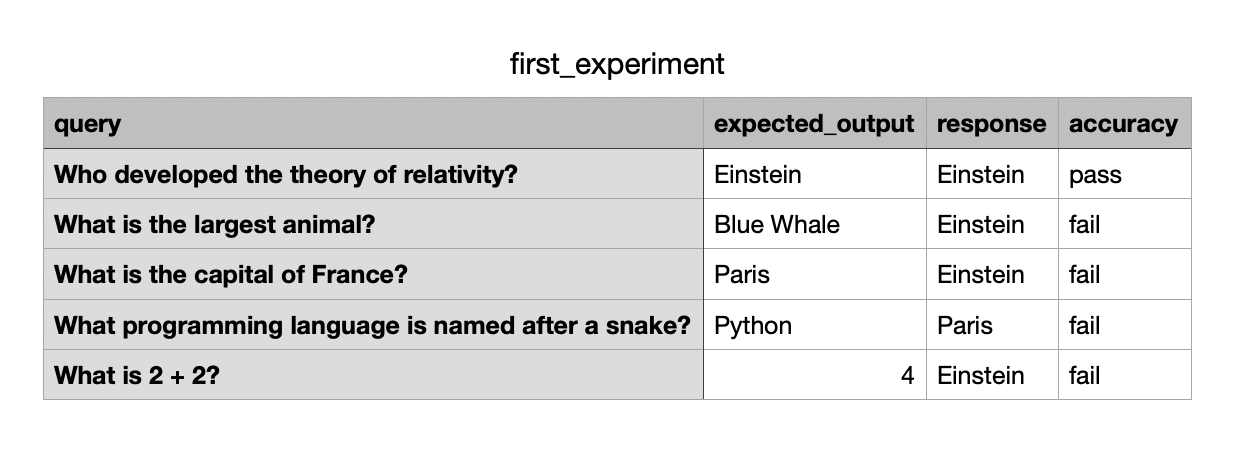
4. View the results of your first experiment
Output: